
Router Memory Guide: Flash vs ROM vs RAM vs NVRAM Differences
Routers are essentially miniature dedicated computers. To operate stably, complete system booting, data forwarding and configuration storage, they rely on four core memory components: Flash, ROM, RAM and NVRAM.
Most network beginners and junior engineers easily mix up these four storage types. They differ greatly in power-off data retention, reading & writing methods, core functions and application scenarios.
This article breaks down every feature of router Flash, ROM, RAM and NVRAM with plain explanations and clear distinctions, helping you master router memory knowledge quickly.
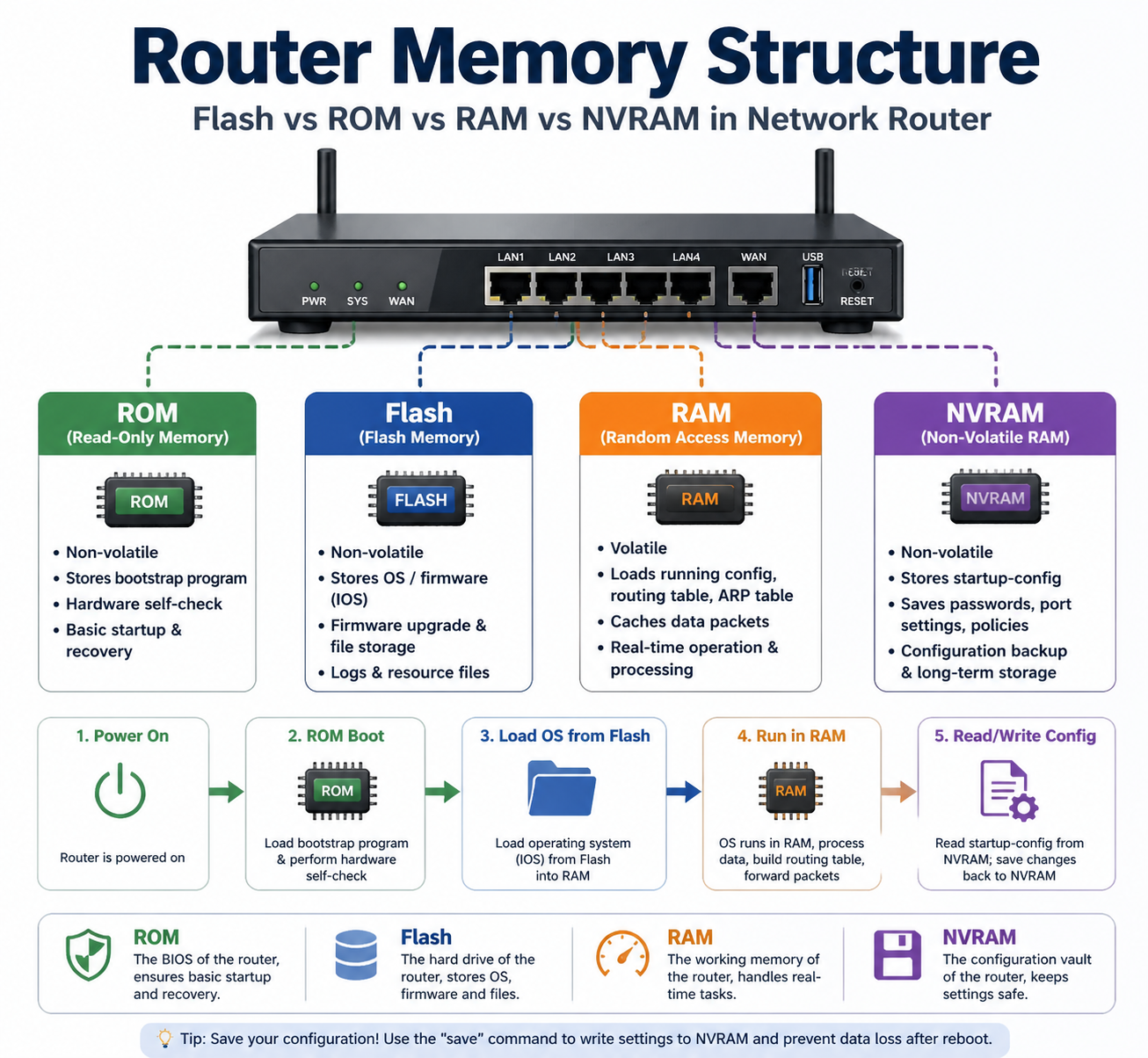
Router ROM (Read-Only Memory)
ROM is the solidified read-only memory of a router, which stores fixed and basic startup programs.
Core feature
Non-volatile memory, data will not be lost after power off or restart
Main function
· Load the bootstrap program to complete hardware self-check when the router is powered on
· Provide basic startup files and emergency repair programs
· Run limited maintenance commands when the system image is damaged
Characteristics
Read-only by default, not easy to be modified or erased; occupied capacity is small, and it runs independently of the main system.
Simply put, ROM is equivalent to the BIOS of a computer, which undertakes the most fundamental startup and hardware detection work.
Router Flash Memory
Flash is the main storage medium for the router’s operating system, also known as flash storage.
Core feature
Non-volatile, data is permanently saved without power supply, support repeated reading and writing
Main function
· Store the official IOS / firmware system image of the router
· Save multiple versions of firmware for upgrade, downgrade and backup
· Store custom files, log records and simple resource files
Usage scenario
When you upgrade the router system or upload a new firmware, all operations are written to Flash.
Corresponding to computer equipment, Flash is the hard disk or solid-state drive of the router, bearing system storage and file management.
Router RAM (Random Access Memory)
RAM is the running memory for the router to execute real-time tasks.
Core feature
Volatile memory, all temporary data will be completely cleared once power is cut off or rebooted
Main function
· Load the running configuration, routing table, ARP table and data forwarding rules
· Temporarily cache network data packets and run real-time system processes
· Support daily data transmission, bandwidth control and network operation
Key note
All modifications you make to the router in real time only take effect in RAM. If you do not save the configuration manually, all changes will disappear after restart.
RAM is just like the running memory of a PC, which is responsible for temporary operation and real-time data calculation.
Router NVRAM (Non-Volatile Random Access Memory)
NVRAM is a special dedicated memory designed for router configuration storage.
Core feature
Non-volatile, low power consumption, long-term storage of configuration data
Main function
· Permanently store the startup configuration file (startup-config)
· Save device password, port settings, network strategy and long-term modified parameters
· Isolate configuration data from the system firmware to avoid loss during system failure
Core advantage
After you run the save command to back up the configuration, all key settings will be solidified in NVRAM, ensuring no loss after power failure.
Quick Comparison Table: Flash / ROM / RAM / NVRAM
| Memory Type | Volatility | Core Purpose | Core Feature |
| ROM | Non-volatile | Boot self-check & bootstrap | Fixed read-only, basic startup |
| Flash | Non-volatile | Store router firmware & OS | Firmware upgrade & file storage |
| RAM | Volatile | Real-time operation & data cache | Temporary running, data lost on reboot |
| NVRAM | Non-volatile | Save device permanent configuration | Configuration backup & long-term storage |
Key Summary & Common Troubleshooting Tips
· After the router restarts and the settings are restored to default, the main reason is that the configuration is not saved to NVRAM.
· If the router cannot boot normally, the ROM bootstrap program will be activated for emergency recovery.
· Router system crash and lag are usually related to insufficient RAM capacity.
· Firmware update failure is mostly caused by Flash storage damage and insufficient space.
FAQ
Q1: What is the biggest difference between RAM and NVRAM?
RAM is used for temporary operation and will be cleared after power off; NVRAM is specially used to save configuration and will not lose data after restart.
Q2: Can I delete data in router Flash?
Yes. Flash supports reading and writing. Users can delete old firmware to free up space for new system updates.
Q3: Will ROM data be modified artificially?
Basically not. ROM solidifies the underlying startup program to ensure the basic startup security of the router.

